Your charts travel between your iPhone and iPad. They never visit us.
Jyotish Notes for iPhone and iPad · iCloud sync · Coming in iOS 1.5 · Updated October 6, 2026 · On Android? See Google Drive sync.
They stay in your own iCloud, secured by your Apple Account.
Sync is coming to Jyotish Notes for iPhone and iPad in version 1.5. Save a chart on your iPhone, open it on your iPad. It gets there through your own iCloud, in a private space that only Jyotish Notes can open, on the Apple Account your devices are already signed in to.
Not through our cloud. We didn't build one. That was the whole idea, on Android and now on iOS.
Thank you, Apple
We are grateful for the Apple ecosystem. iCloud gives every app a secure, personal space of its own, on the Apple Account you already use for your photos and documents. Keeping a cloud secure is best left to the experts: Apple does cloud, while you do Jyotish.
That space is sealed off from every other app. No other app on your iPhone, iPad or Mac, and no app on anyone else's device, can open it, so the names and birth details in your charts are out of reach of prying apps.
Three questions worth asking
“Stored securely in the cloud” leaves out three things. Here are the answers for Jyotish Notes on iOS.
- Whose cloud? Yours. Your charts go into your iCloud, on your Apple Account. Nothing new to sign up for, and no new password.
- Who else holds a key? Not us. Apple runs iCloud and encrypts what it stores; we have no access to your iCloud, and the app sends nothing to us.
- What if a company has a very bad day? We hold nothing of yours, so there is nothing of yours for us to lose. Keeping iCloud safe is Apple's work, and your Apple Account's password and two-factor authentication are the lock.
The whole journey is:
your iPhone → your iCloud → your iPad
There is no fourth stop.
What syncs
One switch covers everything: Sync charts, notes and settings, on the iCloud Sync card in Settings.
| It carries | Including |
|---|---|
| Your saved charts | Names, birth dates, times and places, and each chart's settings. Moving a chart to Deleted, and deleting it for good, travel too. |
| Your chart notes | What you've written on each chart, with its tags. |
| Your saved places and settings | Your default city and saved places, and app settings such as the ayanāṁśa, chart style, language, appearance, which daśās show, and your Yoginī mapping. |
Sync is off until you turn it on. Leave it off, and Jyotish Notes stays entirely on your device, as it always has.
Before you start
- Sign in to iCloud on each iPhone and iPad, with the same Apple Account. That account is what joins your devices.
- Sync is part of the subscription on iPhone and iPad, as saving your own charts is. Your subscription belongs to your Apple Account, so your iPad gets it at no extra cost: on the second device, use Restore Purchases in Settings if it doesn't show as active.
- It counts against your iCloud storage. As a guide, on the generous side: 500 charts take up to about 5 MB, and 500 full-length notes (1,000 characters each, written in Devanagari) up to about 25 MB more. A free iCloud account holds 5 GB.
- The app supports up to 1,000 charts, and 1,500 notes a year for each chart.
- You need a network connection for changes to travel. The app works offline exactly as before; changes wait and go when you are back online.
Turning it on
Open the Settings tab, find the iCloud Sync card, and switch on Sync charts, notes and settings. Do the same on your other device.
The first sync sends this device's library to your iCloud and brings down anything your other device has already put there. A large library takes longer the first time; keeping the app open on the Settings tab until it settles is the surest way through it.
There is no permission screen to approve and no password to type: the app uses the iCloud your device is already signed in to.
Everyday use
- Your changes are sent as you save.
- Changes from your other device arrive by themselves, and the app catches up whenever you open it.
- Sync with iCloud, on the card, asks iCloud straight away instead of waiting. The card also shows when it last checked, or how many changes are waiting to upload.
- Deleting is synced too. A chart deleted for good on one device is deleted on the others.
- App log (Settings → App log → Show app log) lists the last few things the app did, sync included. If you ever write to us about sync, that is what to read out.
A new iPhone or iPad, or a reinstall
Install Jyotish Notes, sign in to iCloud with the same Apple Account, restore your subscription, and switch sync on. Your library arrives from iCloud in the first sync. Uninstalling the app does not remove anything from your iCloud: the synced copy waits there until you switch sync on again.
If your subscription ends
Sync pauses. Nothing is deleted, not on your devices and not in your iCloud. Subscribe again and it picks up where it left off.
Stopping sync
Switch Sync charts, notes and settings off. Syncing stops on that device and nothing is deleted, there or in your iCloud. Switch it back on whenever you like.
Deleting your data from iCloud
You don't need the app for this: iOS has its own button, in Settings. First switch Sync charts, notes and settings off in Jyotish Notes on every device, so none of them sends its copy back. Then, on any iPhone or iPad signed in to your Apple Account:
- Open Settings and tap your name at the top.
- Tap iCloud.
- Tap Manage Storage (on some versions, Storage), and choose Jyotish Notes.
- Tap Delete Data From iCloud, and confirm.
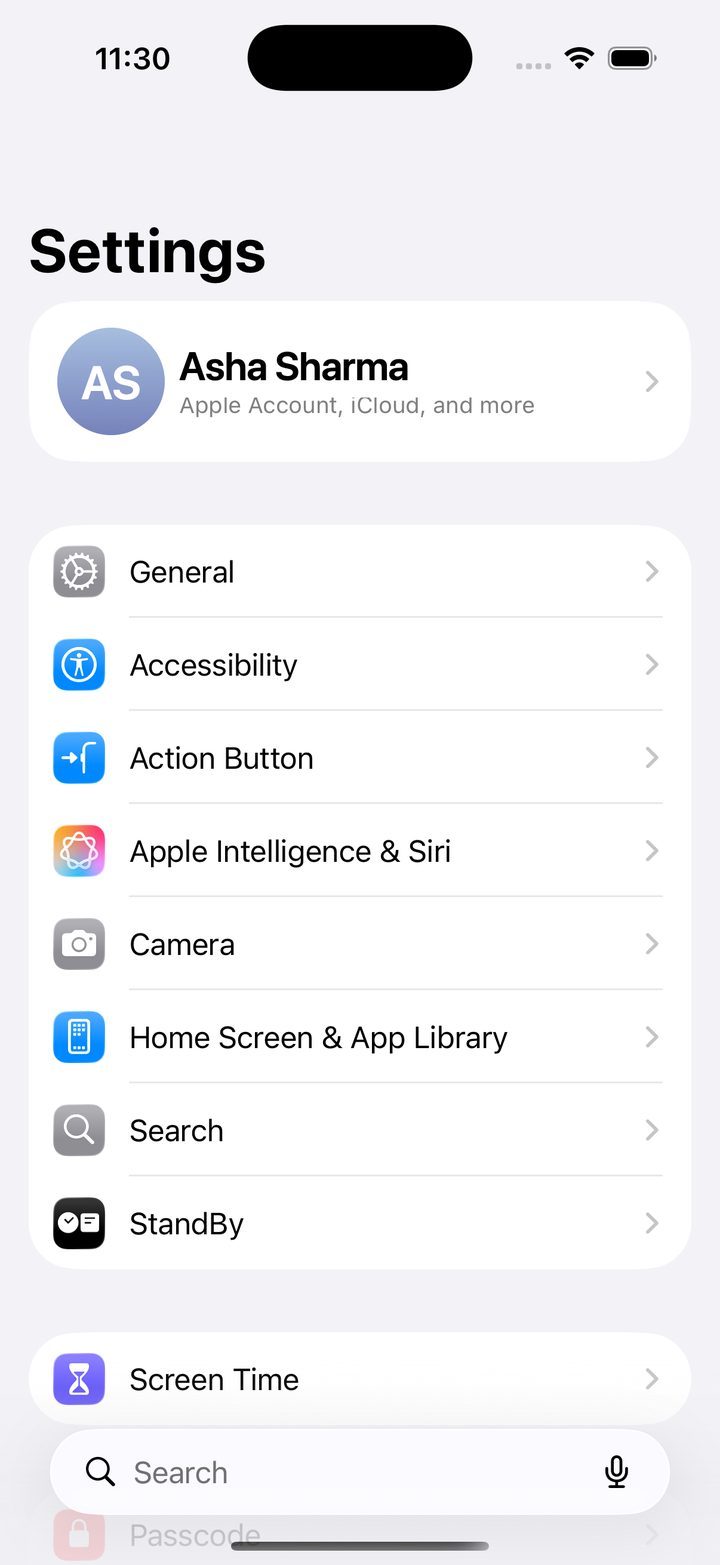
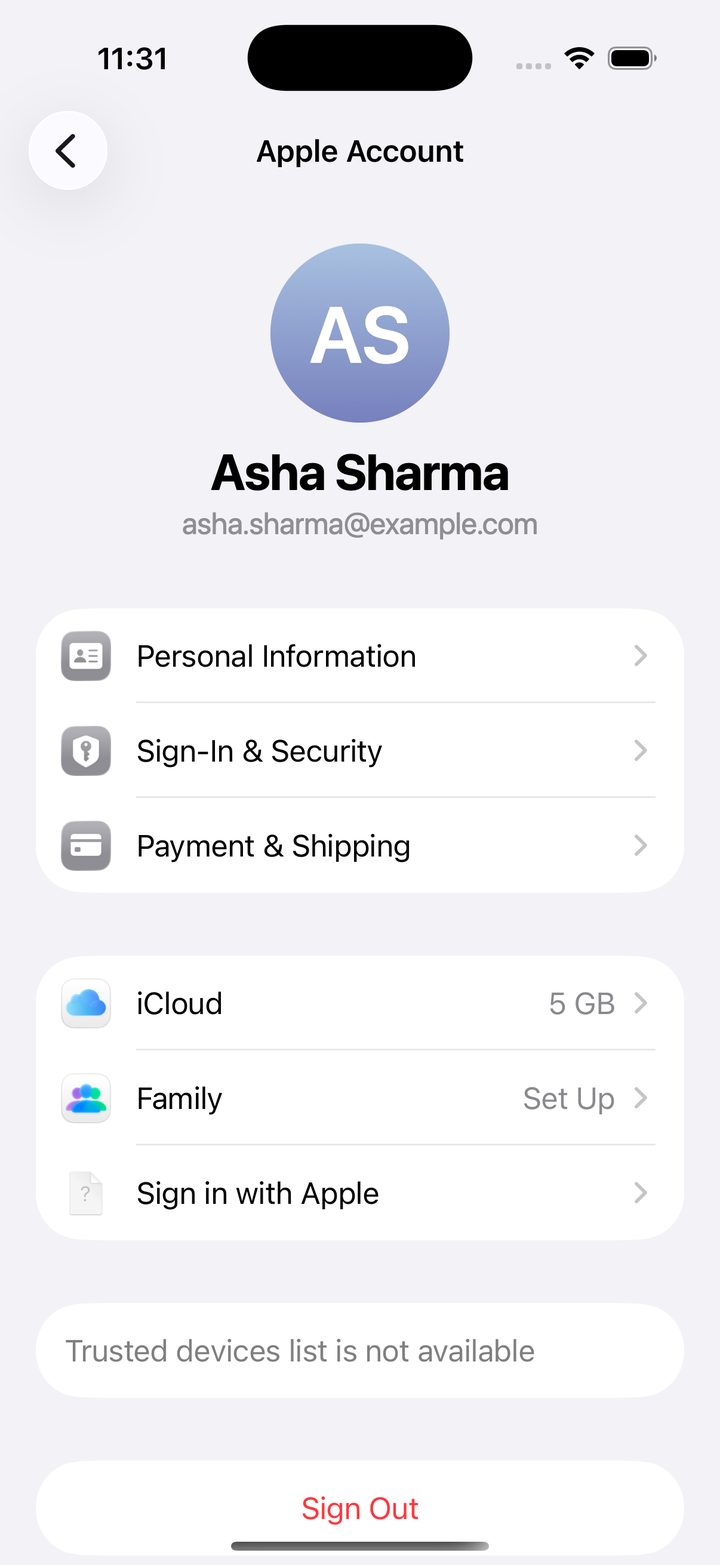
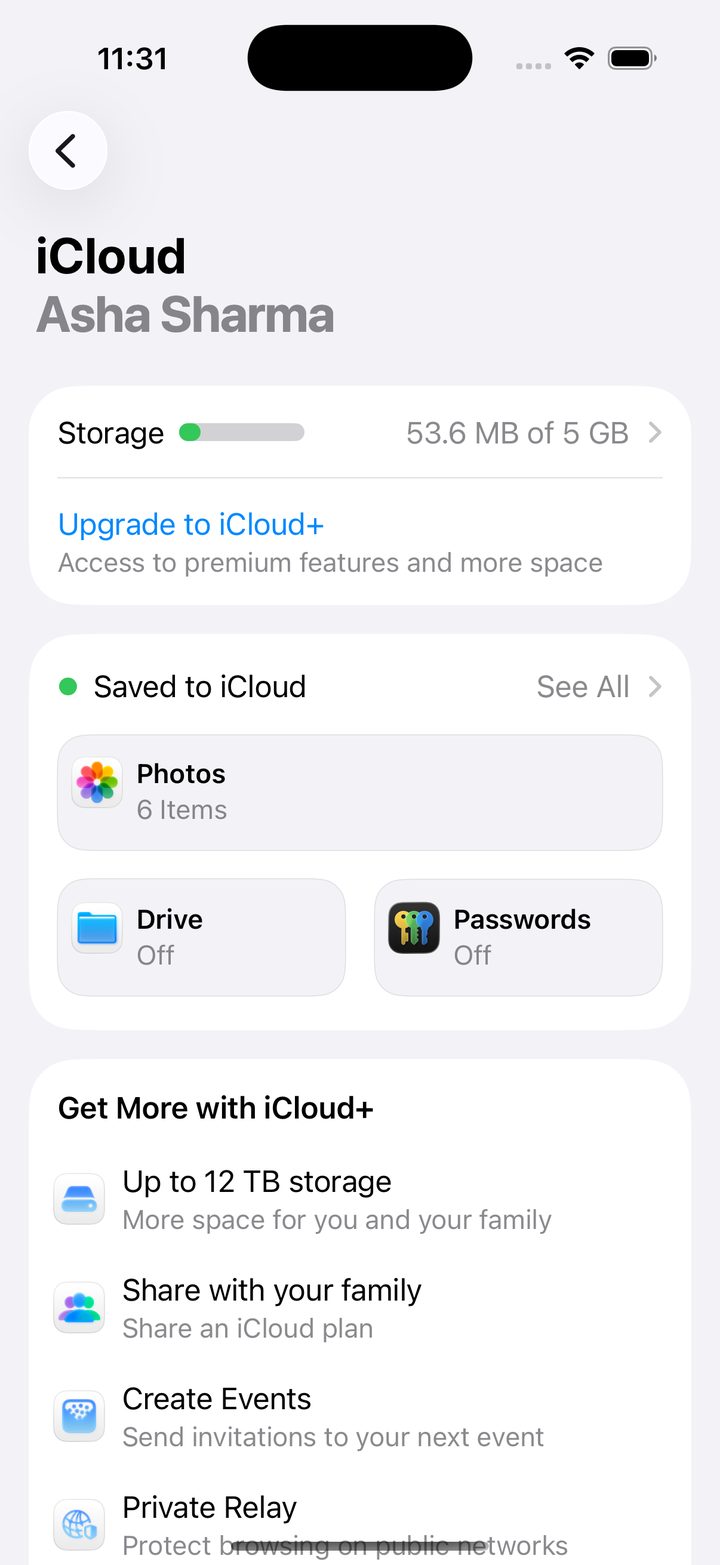
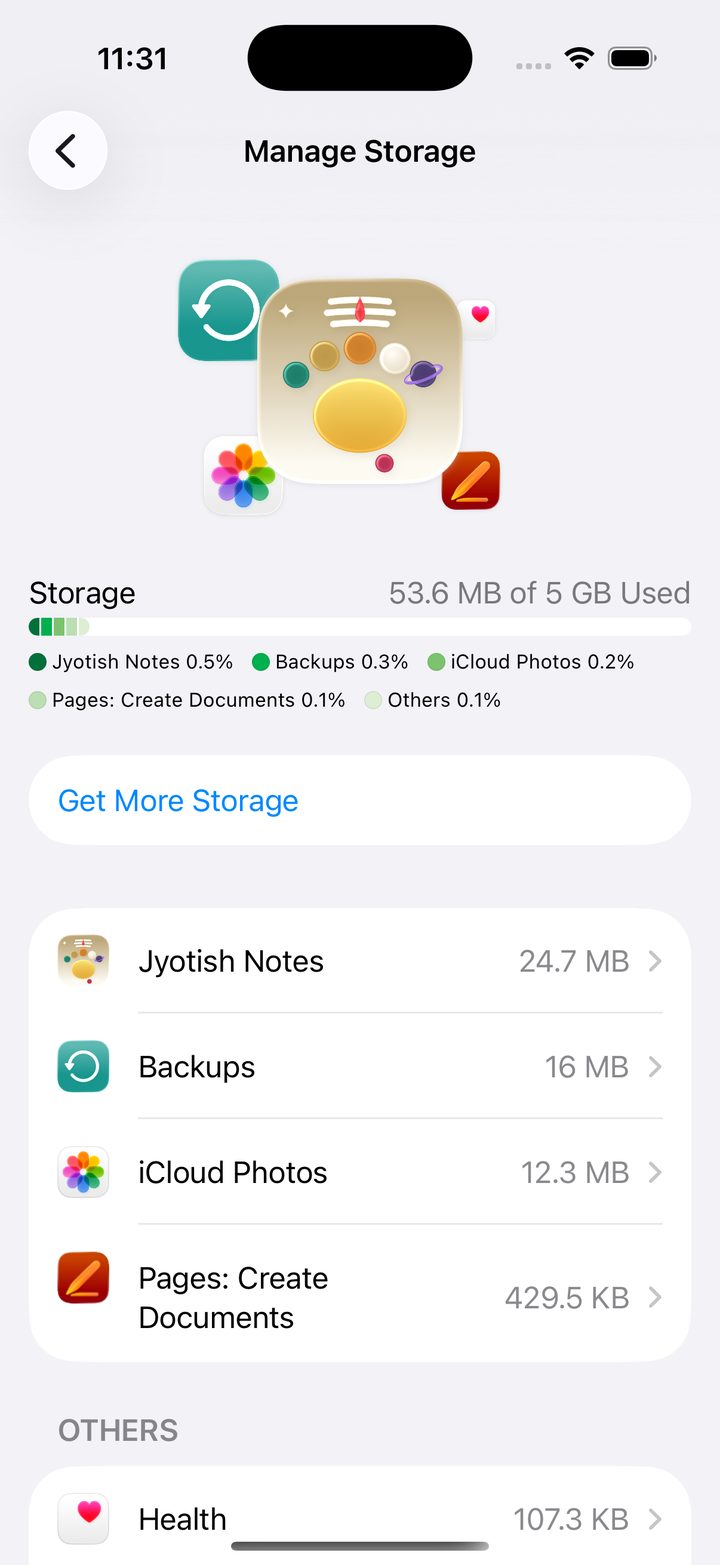
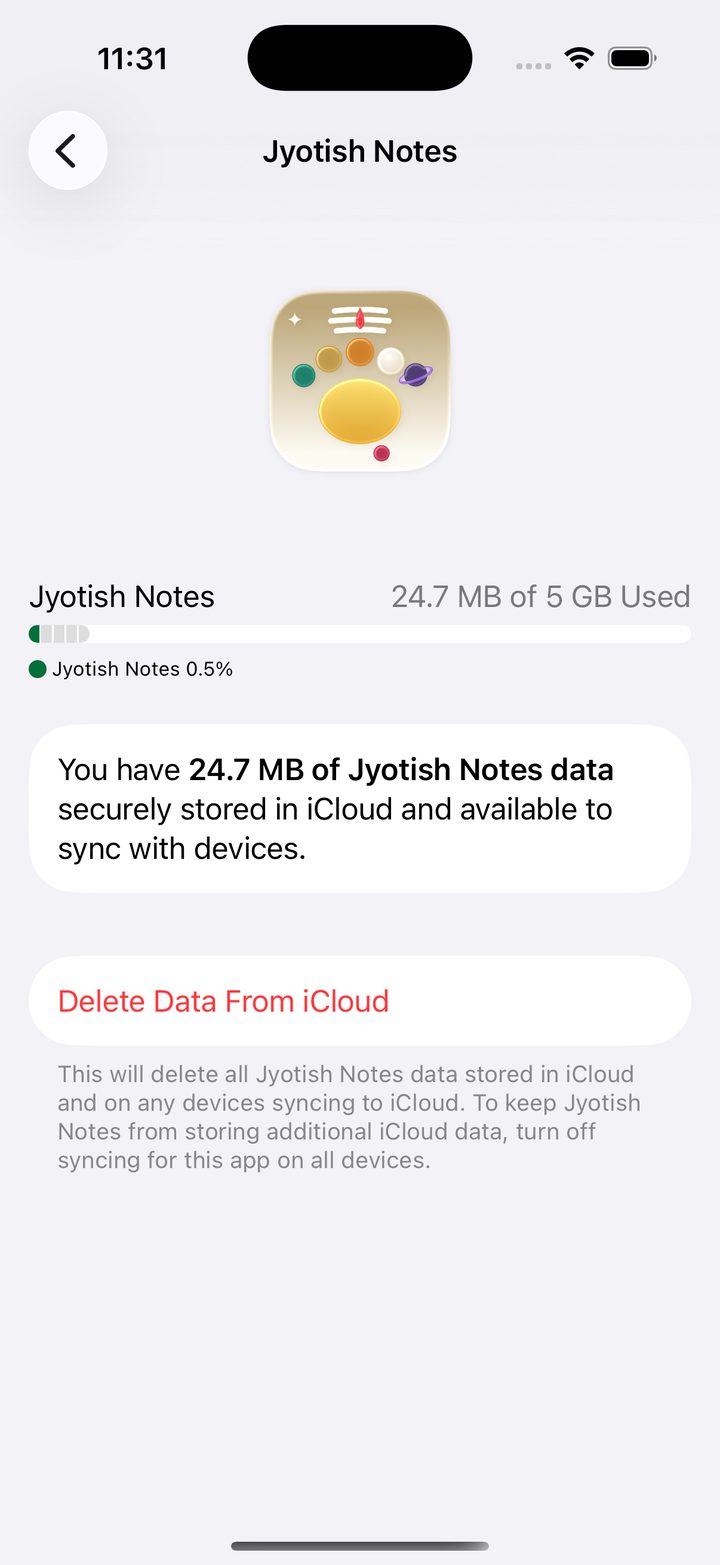
This removes the copy in your iCloud. The charts and notes on each device are kept until you delete them in the app or uninstall it. We keep nothing: your data never reached us, so there is no copy of ours to delete.
The screenshots show a sample account; the name and email address are made up.
Who can see it
| Who | Can they open your synced charts? |
|---|---|
| Other apps | No. The data sits in iCloud space that belongs to Jyotish Notes alone, sealed off from every other app. |
| Us, the makers of Jyotish Notes | No. Your charts go from your device to your iCloud. We are not on the route, and we have no access to your iCloud. |
| Apple | Apple stores and protects iCloud data under its own privacy policy and iCloud security, as for everything else in your iCloud. |
| You | On every device signed in to your Apple Account with sync on. |
Good habits
- Keep your Apple Account strong: a good password and two-factor authentication. It guards your photos and documents; now it guards your charts too.
- Open the app on each device now and then, so it can catch up.
- Before you start working on another device, open the app there and let it finish catching up first.
- Sync is not iCloud Backup. Sync keeps your devices in step; iCloud Backup is the copy of your whole device that iOS makes on its own schedule. They are separate, and you can use either or both.
When something goes wrong
If something needs your attention, the dot on the iCloud Sync card turns red and the message under it says what.
| The card says | What to do |
|---|---|
| Not signed in to iCloud on this device. | Sign in at Settings → Sign in to your iPhone (or iPad), with the same Apple Account as your other devices. |
| iCloud is temporarily unavailable. Check Settings › Apple Account. | iOS usually wants your Apple Account password again. Open Settings, tap your name, and follow what it asks. |
| iCloud is restricted on this device. | Screen Time or a device manager has turned iCloud off for apps. Whoever manages the device can allow it. |
| Couldn't reach iCloud. | Usually the network. Check Wi-Fi or mobile data, then tap Sync with iCloud. |
| iCloud didn't accept N changes. | Tap Sync with iCloud to try again. If it stays, write to us with what the App log shows. |
Still stuck? Write to support@jyotishnotes.com with a screenshot of the iCloud Sync card and what the App log shows.
Privacy
- Your data goes from your device to your own iCloud, over an encrypted connection. It never passes through us, and we have no way to read it.
- Sync is off until you turn it on, and you can stop it, or delete the synced data, at any time.
Our Privacy Policy covers the rest.